Point your camera at dinner.
KalTrack reads the plate and gives you an honest calorie range and the macros in seconds. No database searching, no weighing every ingredient.

Free on iPhone. A few AI scans every day at no cost; KalTrack Pro removes the limit.
Three steps, about ten seconds
- 1
Point and shoot
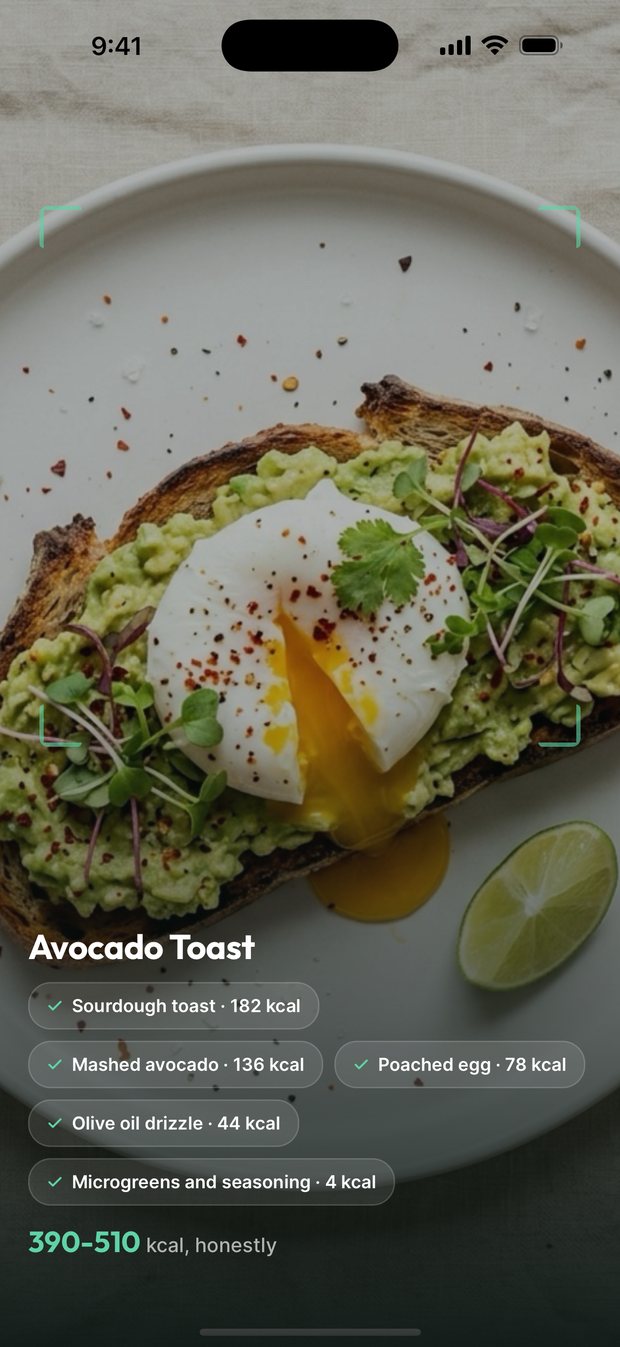
Fit the plate in frame and tap, or pick a photo you already took. You watch it find each thing on the plate. The photo is analysed and not stored on our servers.
- 2
Get a range, then tighten it
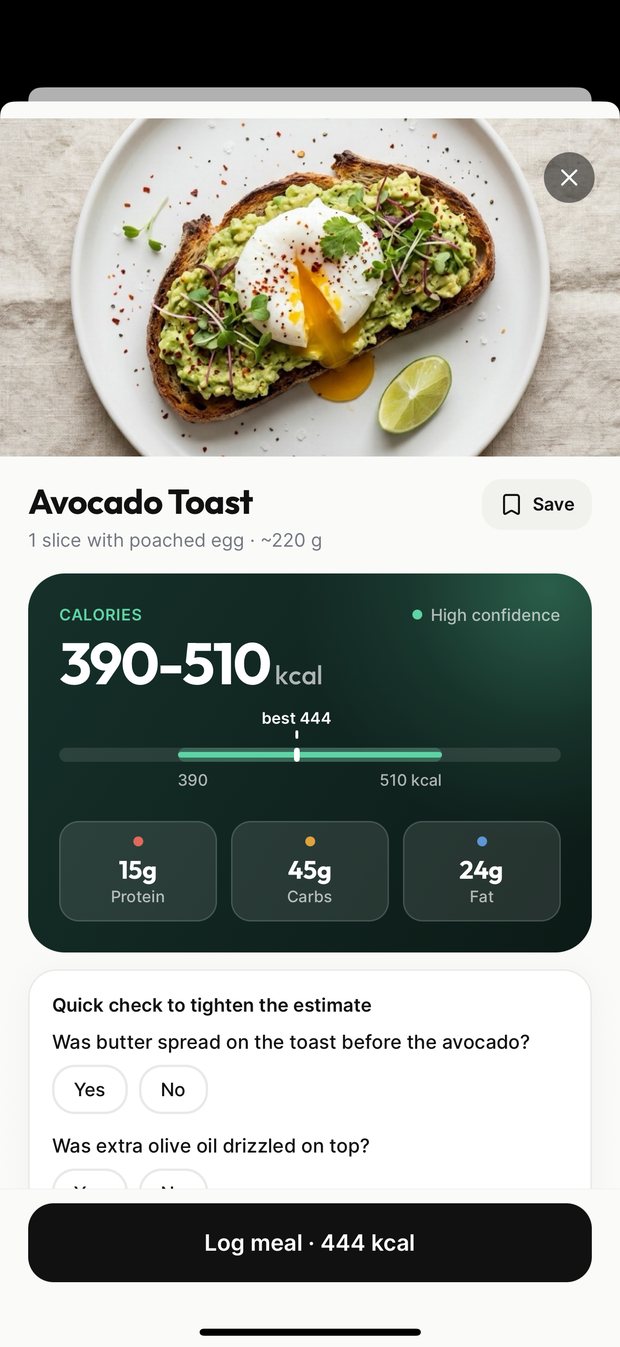
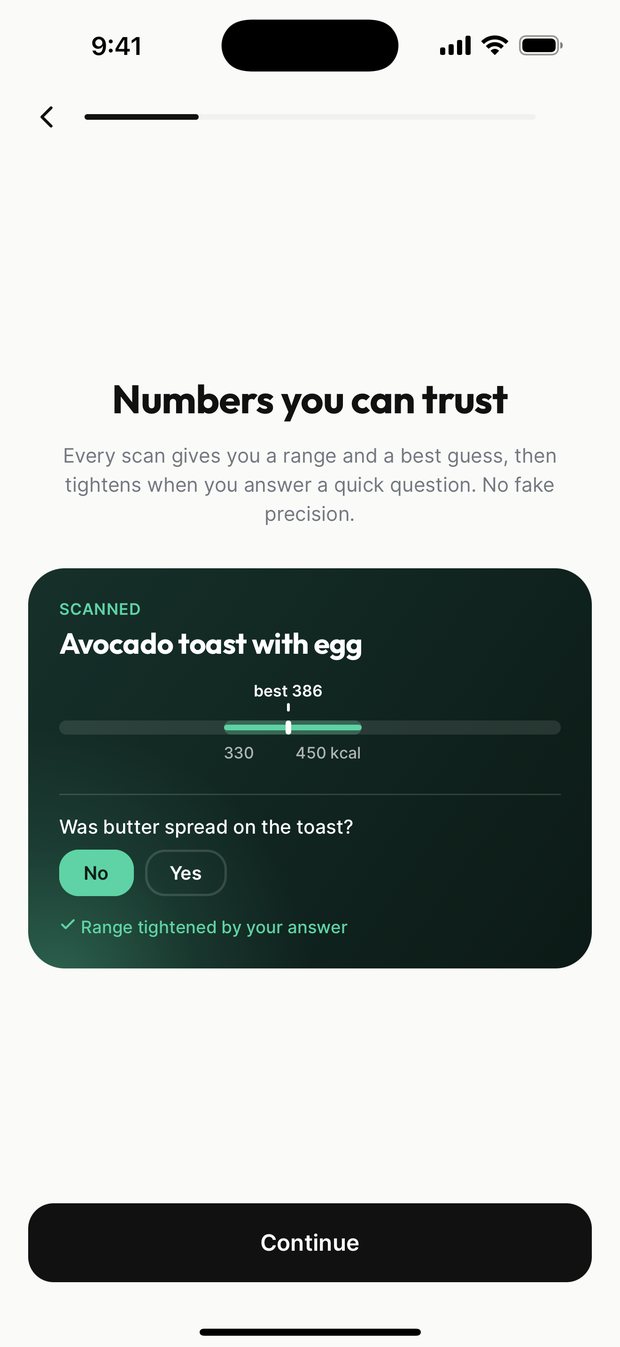
You see every item it found and a calorie range with a best guess inside it. Answer a quick yes or no question, like whether there was butter on the toast, and the range narrows.
- 3
It lands in your day
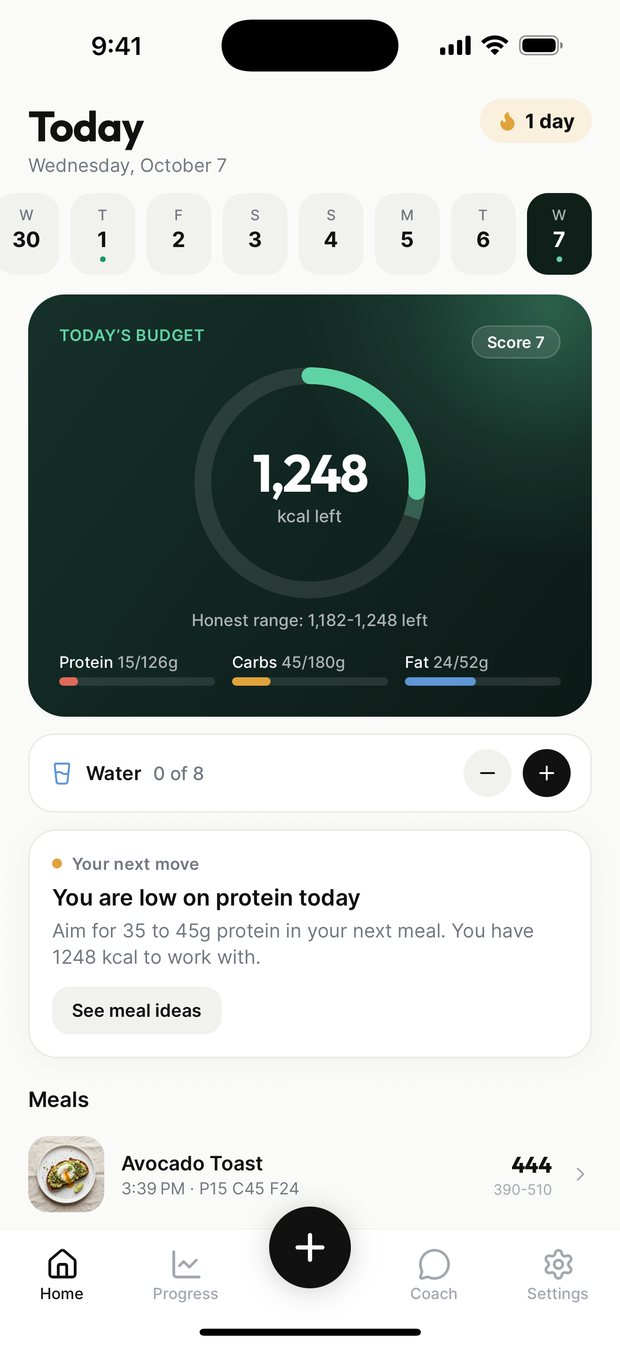
Calories and macros go against today's budget. Save meals you eat often and log them again in one tap. The diary works offline and syncs when you are back on a signal.
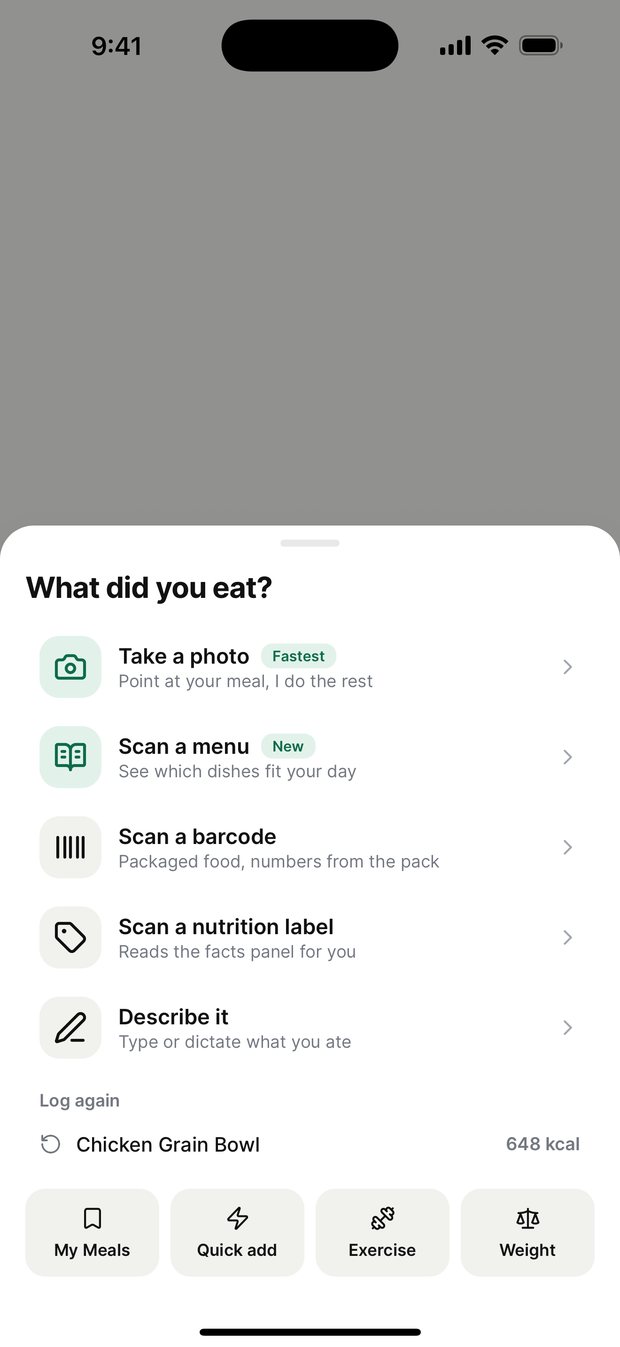
Five ways to log. Pick whichever is fastest.
The camera is quickest for a plate. When the exact figures are printed somewhere, KalTrack reads them instead of guessing.
A meal on a plate
Home cooking, mixed dishes, restaurant plates, any cuisine. Dishes are recognised as themselves rather than mapped onto the nearest database entry.
A restaurant menu
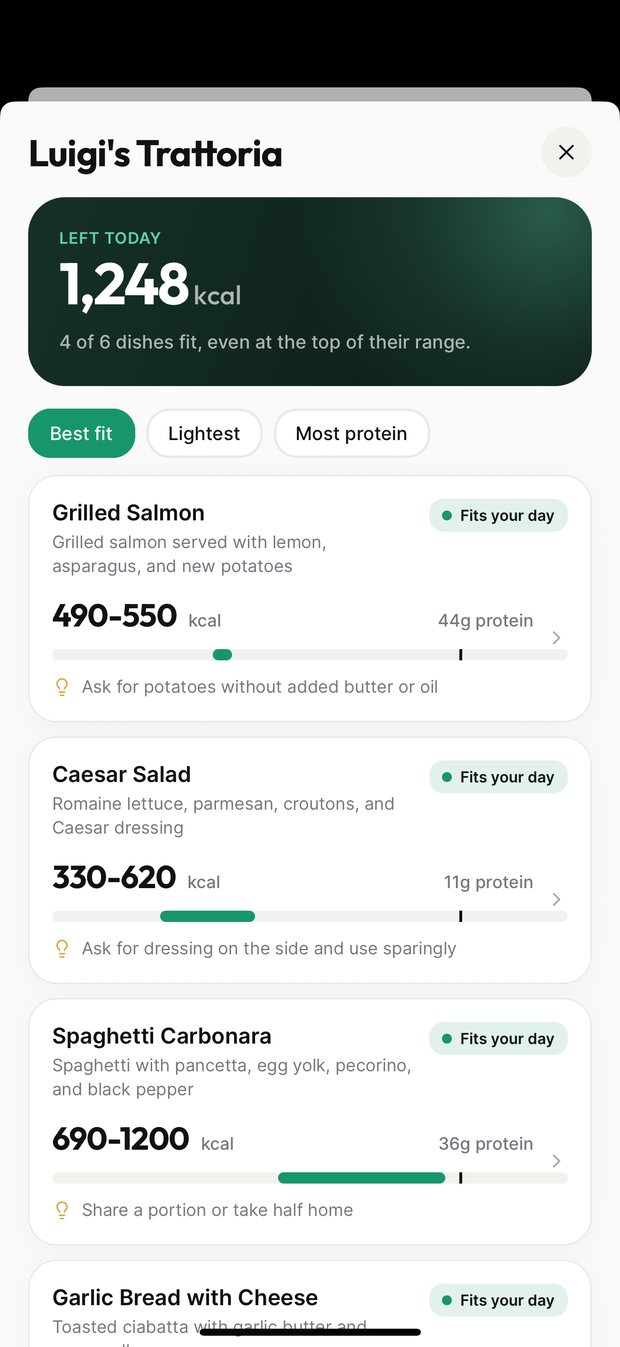
Eating out? Photograph the menu and every dish is ranked by how well it fits the calories you have left today, with a tip for ordering it lighter.
A barcode
Packaged food scans against the Open Food Facts database and returns the manufacturer's own figures. Barcode lookups never count against your free scans.
A nutrition label
Point at the panel on the back of the box and KalTrack reads the printed numbers. Not a guess about what is inside.
Describe it
Type what you ate in plain words, like two eggs and toast with butter. Useful when the plate is already gone.
What it looks like
What a photo can and cannot tell you
A photograph shows surface area. It does not show the oil the vegetables were fried in, the butter under the steak, or the weight of the rice under the curry. So a photo estimate has real error, and the error usually runs low: hidden fats and dense carbohydrates are exactly what a camera cannot see.
KalTrack is built around that rather than in spite of it. Instead of one confident number it gives you a range with a best guess inside it, shows you every item it found, and asks a quick question or two about the things a camera cannot see. Your answers tighten the range. Where a figure can be read rather than guessed — a barcode, a printed label — it reads it instead.
Use the numbers as a consistent signal you can steer by, not as a measurement. If you need clinical precision, weigh your food; nothing that works from a picture is a substitute for a scale, and KalTrack is not a medical device.
Questions
How accurate is a calorie estimate from a photo?
It is an estimate, not a measurement, so KalTrack shows it as a range with a best guess rather than one falsely precise number. Estimates tend to run low because the things a camera cannot see, like cooking oil, butter and dressing, are calorie-dense, which is why the app asks a quick question about them and narrows the range from your answer. Barcodes and nutrition labels are read exactly. The accuracy page goes through this properly.
What does it cost?
The app is free to download and you get a few AI scans every day at no cost: photos, menus, labels and typed descriptions each use one. Barcode lookups are always free and do not count. KalTrack Pro removes the scan limit at $9.99/month or $29.99/year, each with a 7-day free trial. The billed price is shown before you start the trial, and you cancel in iOS Settings in two taps.
Does it work for food from any cuisine?
Yes. Most calorie trackers were built against one country's food database and quietly turn unfamiliar dishes into the nearest familiar one. KalTrack's analysis is cuisine-aware, so a dal, a pho or a mole is recognised as itself, and you can tell the app what you usually eat so it accounts for typical cooking fats.
Can it help when I eat out?
That is what menu scan is for. Photograph the menu and KalTrack lists every dish with a calorie range, marks the ones that fit what you have left today, and suggests an easy way to order each one lighter. Tap a dish to log it.
Is my meal photo kept?
No. It is sent for analysis, used to produce the estimate, and not stored on our servers. The privacy policy names every third party involved, including the AI model that does the analysis.
Does it work without a connection?
The diary does — entries are stored on your device and sync when you are back online. Scanning needs a connection because the analysis runs on a server.
Does it connect to Apple Health?
Optionally. With your permission it reads steps and active energy to adjust your daily budget, and can write what you log back to Health. Those readings stay on your device.
Is there an Android version?
Not yet. KalTrack is iPhone-only today and Android is in development. There is no date to promise, so we are not promising one.
How do I cancel?
In Settings → your name → Subscriptions on your iPhone. That is Apple's flow, it is two taps, and we have no separate one designed to slow you down. Cancelling before the trial ends means you are not charged.